 Smartify
AI Training for Teams: What Actually Changes How People Work
Most AI training fades within weeks. What makes it stick: real workflows, sessions split by role, artifacts people keep using, and an owner afterwards.
Most AI training doesn’t fail because the content was wrong. It fails because three weeks later, everyone is working exactly the way they did before.
You can usually spot it in the usage data. A spike the week of the session, a smaller spike the week after, then a flat line near zero with two or three enthusiasts holding the average up. The training happened. The change didn’t.
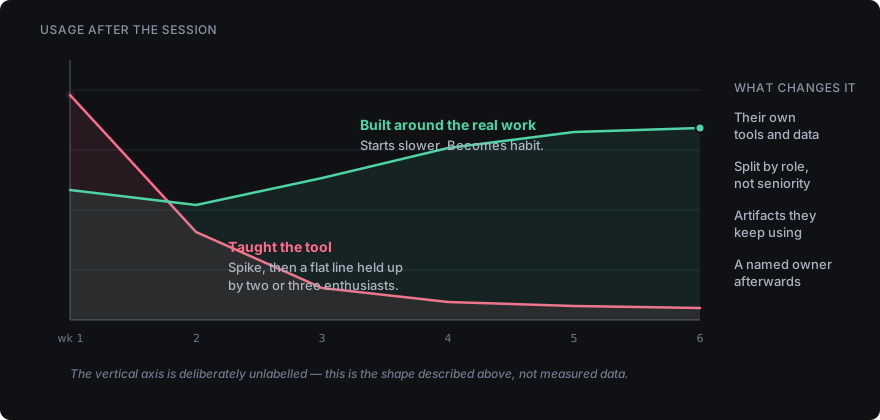
This is worth understanding properly, because the fix isn’t better slides — it is building the training around the work itself.
Why generic AI training doesn’t stick
The standard corporate AI session teaches the tool. Here’s the chat window, here’s how to write a prompt, here are ten prompts you can try. It’s a demo with a workbook.
The problem is that nobody’s job is “use AI.” Their job is to qualify inbound leads, or close out support tickets, or reconcile invoices. A session that teaches the tool in the abstract leaves every person in the room with the same unanswered question: what do I actually do differently on Monday?
Three things reliably kill adoption:
The examples aren’t their work. Summarising a generic press release is not the same task as summarising the specific, messy, half-structured notes your team writes. People watch the demo work, try it on their real inputs, get worse results, and conclude the tool is oversold.
There’s no second contact. One session, no follow-up, no place to ask the question that surfaced a week later when it actually mattered. Skills that aren’t used within a few days of learning them decay to nothing.
Nobody defined what’s allowed. People are quietly unsure whether they’re permitted to paste a customer’s details into a model. In the absence of a clear rule, cautious people stop and incautious people create a problem. Both outcomes are bad, and both are avoidable with one page of guidance.
What changes when training is built around the work
The difference between training that sticks and training that evaporates is whether people leave with something they keep.
Train inside their own tools and data. Not a sandbox, not sample documents — the actual CRM records, the actual ticket queue, the actual spreadsheets. This is more work to set up and it is the single highest-leverage decision in the whole programme. When someone sees their own difficult case handled well, the objection dies on the spot.
Split the room by role, not by seniority. Sales, support and operations have almost nothing in common in how they’d use a model. A joint session optimises for nobody. Run them separately, on their real workflows, and the hour is worth four generic ones.
Send people away with artifacts, not notes. The deliverable from a working session is a small set of prompts that solve a recurring task in that person’s job, saved somewhere they’ll find them again. Notes get lost. A shared prompt library that someone owns and prunes does not.
Teach the failure modes explicitly. People need to have seen a model state something false with complete confidence. Until they’ve watched that happen to a task they know the right answer to, they’ll either trust output blindly or reject it entirely. Both are worse than calibrated scepticism.
Write down what may never go into a model. Customer identifiers, credentials, unreleased financials, anything under contract restriction — whatever the list is for your business, it needs to exist in writing before the training, not after an incident. It takes an afternoon, and it is the same single page an internal AI assistant needs before it launches.
What this looks like by role
Sales. Research before a call — pulling a coherent picture of an account from scattered notes and public sources. How well that works depends on what the public record already says, which is the same corroboration problem that decides whether an AI can describe your own business. Drafting follow-ups that reference what was actually discussed rather than a template. Cleaning up CRM notes into something the next person can use. The measurable outcome is time-to-follow-up.
Support. Drafting first responses that a human then edits, rather than writing from scratch. Summarising long threads before escalation so the next agent isn’t reading forty messages. Turning resolved tickets into knowledge base entries, which is the work that always gets deferred and always costs more later.
Operations. Turning unstructured input — emails, forms, PDFs — into structured records. Drafting the first version of documentation for a process that only lives in one person’s head. Reconciliation work where a model proposes and a human confirms.
In each case the pattern is the same: the model does the first pass, the person does the judgement. Teams that invert that ordering get burned.
How to tell whether it worked
Attendance and satisfaction scores measure whether people enjoyed an afternoon. They don’t measure change.
Better signals, in rough order of usefulness:
- Are people still using it in week six? The honest test. Everything else is noise if this line is flat.
- Has anything become standard practice? A prompt that a whole team now uses for the same recurring task is worth more than a hundred individual experiments.
- Has a real task got faster or better, measured the way you’d measure any process change — time to first response, time to close, error rate on a specific step.
- Are people asking sharper questions? Early questions are about the tool. Later questions are about where the boundary sits, how to handle a specific edge case, whether a particular workflow is worth automating. That shift is the clearest sign the capability has actually landed.
When training is the wrong answer
It’s worth being honest about this, because it’s common.
If the process you want to improve isn’t written down anywhere, training won’t help — you’ll teach people to accelerate something nobody can describe. Document it first.
If the underlying data is inaccessible or a mess, the constraint isn’t skill. No amount of prompt technique reaches a system that can’t be queried, and working out what would reach it is a question for a strategy engagement rather than a training day.
If nobody owns the outcome after the session ends, the programme will decay regardless of quality. Someone has to be responsible for the prompt library, the guidance, and answering questions in week four. Without that, you are buying an event, not a capability — the same absent ownership that quietly kills most internal AI assistants.
And if the real need is one specific automation running reliably in the background, that’s an implementation problem, not a training one. Teaching forty people to do a task by hand with AI assistance is the expensive way to solve something that should run on its own.
The short version
Training changes how people work when it happens inside their real workflows, splits by role, leaves behind artifacts they keep using, and is owned by someone after the room empties. Training that teaches the tool in the abstract produces a spike in usage and a flat line after.
The goal isn’t for your team to know what a large language model is. It’s for a specific recurring task in a specific job to be measurably better in six weeks, and for the people doing it to be able to extend that themselves without calling anyone.