 Smartify
Giving Your Team AI Assistants That Actually Get Used
Internal AI assistants get abandoned within a month for four repeatable reasons. What it takes to keep one inside the daily work your team already does.
Most internal AI assistants are built once, demoed to some applause, and quietly abandoned inside a month. The build wasn’t the hard part. Keeping it in someone’s daily path was.
This is one of the things your team learns to get right in our AI training and development work, because it’s a pattern rather than a one-off — the same four mistakes recur across almost every organisation that tries this.
Why they get abandoned
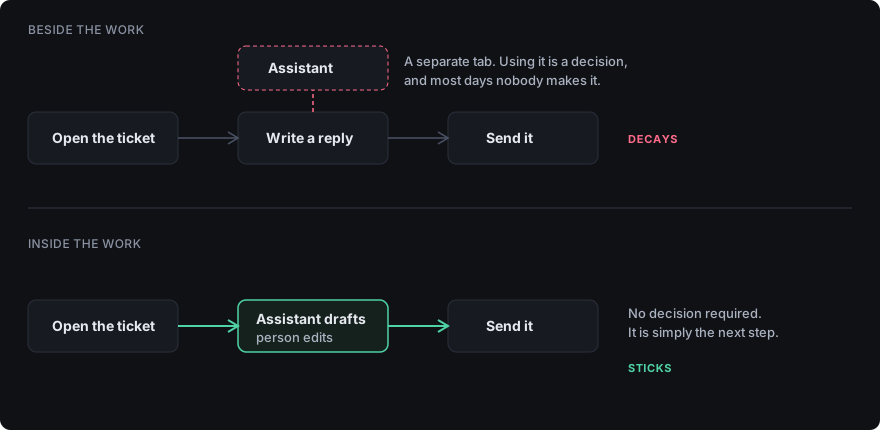
It sits beside the work instead of inside it. An assistant living in its own tab competes with everything else for attention, and loses. The same assistant reachable from inside the tool where the work already happens — the CRM record, the ticket, the document — gets used without anyone deciding to use it. This single choice predicts adoption better than model quality, prompt engineering, or how impressive the demo was.
Nobody owns it after launch. Someone builds it, moves on, and the first time it gives a wrong answer there’s no one to fix it. Trust doesn’t decay gradually here — it collapses the first time a person is embarrassed by output they relied on. Without an owner, that moment is terminal.
It can’t see the data that matters. An assistant that doesn’t know your pricing, your policies, your current inventory, or last week’s decision gives generically plausible answers. People try it on a real question, get something that sounds right and isn’t, and stop. The gap between a demo and a useful tool is almost always data access rather than intelligence.
Nobody said what’s allowed. People are quietly unsure whether they can paste a customer’s details into it. Cautious people stop; incautious people create a problem. Both are avoidable with one page written before launch rather than after an incident.
What your team learns to build instead
The curriculum here is deliberately unglamorous, because the failure modes are.
Put it in the path of existing work. Your engineers learn to surface the assistant where the task already lives, rather than building a destination people have to remember to visit. Usually that’s an integration into an existing tool, sometimes a keyboard shortcut, occasionally a scheduled job that produces output before anyone asks.
Give it real context, carefully. Your team learns how to connect an assistant to internal knowledge without dumping the entire company into it — what to index, what to exclude, how to keep it current, and how to handle the documents that shouldn’t be reachable at all. This is the difference between an assistant that answers questions and one that guesses.
Name an owner before you build. Not a committee. One person responsible for the prompts, the access rules, and the questions that arrive in week four. Your team learns what that role actually involves week to week, so it can be staffed honestly rather than assigned as an afterthought.
Write the boundary document first. What may never go into a model, who may use which assistant, what output must be checked by a human before it leaves the building. Your team learns to write this in an afternoon and keep it to one page — long policies get ignored, and an ignored policy is worse than none because it creates the illusion of control.
Teach the failure modes deliberately. People need to watch a model state something false with total confidence, on a task where they know the right answer. Until they have, they either trust everything or reject everything. Calibrated scepticism is learned by demonstration, not by being warned.
What good looks like by function
Support. An assistant that drafts a first reply from the ticket history, which a person edits. The gain is time-to-first-response, and the reason it survives is that it produces a draft in the place the agent was already working.
Sales. Pulling a coherent account picture from scattered notes before a call, and turning a call into CRM notes the next person can use. How much any model can assemble about a company depends on what has been written down about it, which is also why some businesses never appear when a customer asks an AI. Adoption is high here because the alternative is admin nobody enjoys.
Operations. Turning unstructured input — emails, forms, PDFs — into structured records, with a person confirming rather than retyping. The model proposes, the human disposes. Teams that invert that ordering get burned.
The pattern is consistent: the assistant does the first pass, the person keeps the judgement, and the work happens where it always happened.
How to tell it’s actually working
Not “is everyone excited.” Better signals, roughly in order:
- Is it still in use in week six? The honest test. Everything else is noise if this is flat.
- Has anything become standard practice? One assistant a whole team now relies on for a recurring task beats twenty individual experiments.
- Has a specific task got faster or better, measured the way you’d measure any process change.
- Are the questions getting sharper? Early questions are about the tool. Later ones are about edge cases, boundaries, and whether a particular workflow is worth automating. That shift means the capability has landed.
When not to build one
If the process isn’t documented anywhere, an assistant will accelerate something nobody can describe. Write it down first — for the same reason training fails on undocumented processes.
If the data lives somewhere that can’t be queried, the constraint is access, not intelligence, and no amount of prompt technique reaches it. Establishing which of those two you are actually up against is work for a strategy engagement rather than a build.
If only one person wanted it, you’re building a personal tool at organisational cost. That may still be worth it — but decide that deliberately.
And if what you actually need is one reliable automation running in the background, that’s an implementation problem, not an assistant. Teaching forty people to do a task by hand with AI help is the expensive way to solve something that should run on its own.
The short version
Assistants get used when they sit inside existing work, can see real data, have a named owner, and come with clear rules about what may never go into them. They get abandoned when they’re a separate destination nobody remembers to visit.
None of that requires unusual technical depth. It requires deciding those four things before you build rather than after adoption has already stalled — which is exactly what your team walks away able to do on its own.